Current Lupo Engine Suite — Retiring Soon
This page documents the current 14-day trial edition of the Lupo Engine Suite. Its successor, LUPO Adaptive Structure Suite 2.0 — Gold Edition, is coming soon for NinjaTrader 8 and will support Gold Futures (GC) and Micro Gold Futures (MGC).
Existing downloads, customer accounts, and license records remain unchanged during the transition. Current trial permissions continue through their scheduled expiration.
Lupo Engine Suite | NinjaTrader 8 Algorithms for MGC & GC
This fully functional demo release is provided transparently to support careful evaluation and community feedback. It includes a 14-day, single-machine license.
Engineered for Gold Liquidity & Volatility Structure
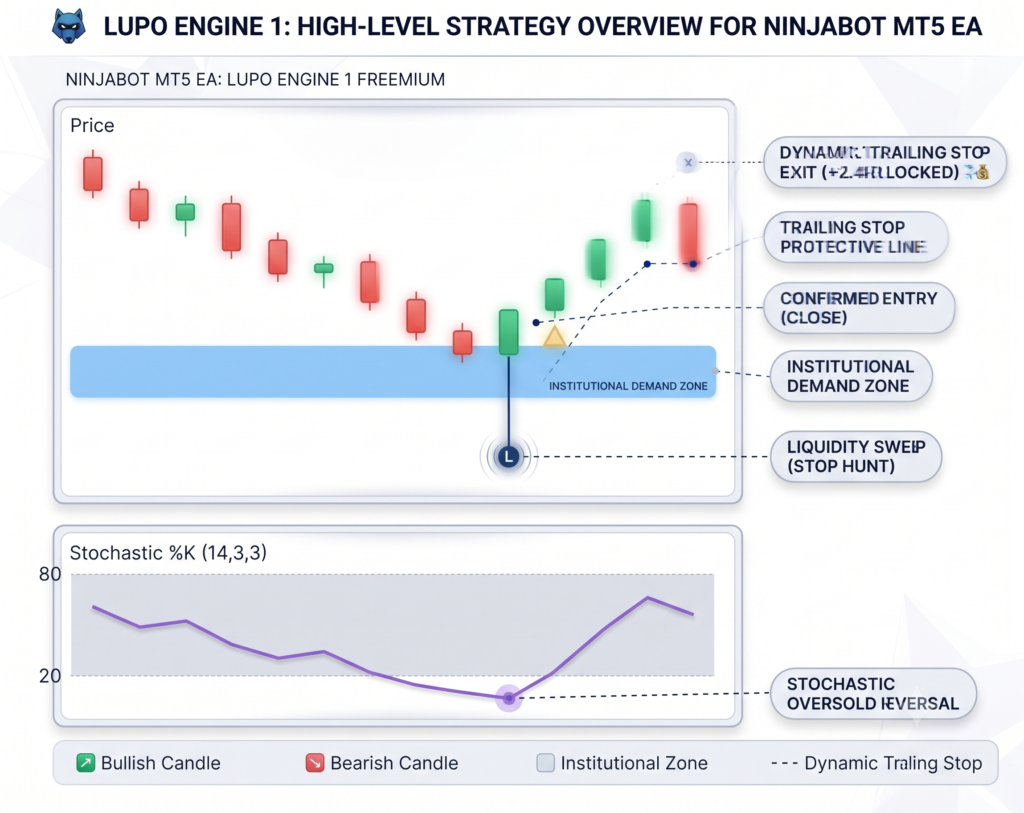
LupoEngineExhaust and Lupo Engine 1 are designed from the ground up specifically around the average daily range, tick size, and institutional zone re-entry behavior of Gold (GC) and Micro Gold (MGC). Parameters are locked and optimized for Gold market dynamics.
Designed for institutional-grade risk management and structured breakout capture. LupoEngineExhaust is built for disciplined traders who prioritize capital preservation and asymmetric returns over fragile, high-win-rate curves.
The included templates use asymmetric risk-to-reward parameters. Performance varies by engine and market regime, so both templates should be tested carefully before deployment. Before you download the bot this guide “The First 30 Days Your Guide” is required reading.
 Support also at Lupo Markets Discord Server
Key Architectural Highlights:

- Asymmetric Risk-to-Reward: Engineered around a robust 3:1 payout structure, prioritizing large winning distributions over frequent small scalps.
- Strict Drawdown Controls: Built-in risk parameters designed to respect daily loss limits and protect account equity during choppy market regimes.
- Full Logic Transparency: No hidden curve-fitting or black-box martingale tricks. Designed with clear mechanical rules.
Technical & Environmental Requirements:
- Platform: NinjaTrader 8 (Latest Version Recommended)
- Recommended Infrastructure: Low-latency connection / VPS (Chicago co-location recommended for optimal execution pricing).
- Regime Note: Performs best in trending markets, expect drawdown clusters if deployed in highly volatile or churning structures.
1. Download the Lupo Engine Suite for NinjaTrader 8
Click the button below to download the current retiring 14-day trial version of the Lupo Engine Suite installation package.
2. System Requirements
| Hardware Component | Official Minimum Specs | Recommended Specs (For Bots & Backtesting) |
|---|---|---|
| Operating System | Windows 10, Windows 11, or Windows Server 2016+ | Windows 11 / Windows Server 2022 |
| Processor (CPU) | 1 GHz or faster 64-bit | Quad-Core 3.0 GHz+ (Intel i7/i9 or AMD Ryzen 7/9) |
| Memory (RAM) | 2 GB | 16 GB to 32 GB |
| Storage | Standard Hard Drive | SSD / NVMe SSD (Essential for tick-data loading) |
| Graphics (GPU) | DirectX 10 compatible | Dedicated GPU (GTX/RTX series for multi-monitor setups) |
| Framework | Microsoft .NET Framework 4.8 | Microsoft .NET Framework 4.8+ |
Simple 3 step installation pdf
3. Installation Steps
Once the download is complete, locate the installer file and double-click to run it. Follow the on-screen instructions to complete the installation process.
4. Initial Configuration & Startup Checklist
After loading the Lupo Engine strategy onto your Micro Gold (MGC) chart in NinjaTrader 8:
- Verify Broker Connection: Ensure your active broker connection shows a green connection indicator in the bottom-left corner of NinjaTrader.
- Select Execution Account: Double-check that the strategy parameters are set to route orders to your desired prop or live account—not the default Sim101 account.
- Enable Automated Trading: NinjaTrader disables automated execution by default upon startup as a safety mechanism. You must manually enable the Automated Trading toggle button in the main NinjaTrader Control Center toolbar (and check the “Enabled” box next to the strategy in the Strategies tab) for the bot to place trades.
Before enabling live orders on your target environment, run through this 3 tier testing routine to verify code stability, template loading, and order routing.
1. Quick Historical Back test (Sanity Check)
This verifies that the assemblies compiled properly on the target machine and that your templates load correctly. Go to Control Center > New > Strategy Analyzer. Select LupoExhaust or LupoEngineStrategy1.Click Template > Load at the bottom right—verify your imported XML template parameters load cleanly. Run a quick 30-day back test on your target instrument (e.g., MGC or GC) to confirm logic completes without throwing dynamic C# runtime exceptions.
2. Forward-Test on Sim101 (Live Market Data)
Now test real-time order generation and event execution without risking capital. Connect to your market data provider or brokerage feed. Open a chart for your instrument or go to Control Center > Strategies tab. Add the strategy and set the Account dropdown explicitly to Sim101. Load your template, set Enabled = True, and click OK.Watch the Control Center > Output and Log tabs as bars print to confirm: Strategy state stays Enabled. Indicators render on chart / calculate in memory without throwing NullReferenceException.Orders submit, fill, and cancel properly on Sim101.
3. Disconnect & Safety Verification
Before flipping the switch to live money, test edge-case behavior: Connection Loss: Briefly disconnect your network or feed to verify your strategies handle reconnect states without spamming duplicate orders. Unfilled / Pending Orders: Confirm that stop loss and take profit bracket orders automatically attach upon position entry.
Once it executes cleanly on Sim101 during live market hours, you are officially good to test live.
Download Start Analyzer Guide (PDF)
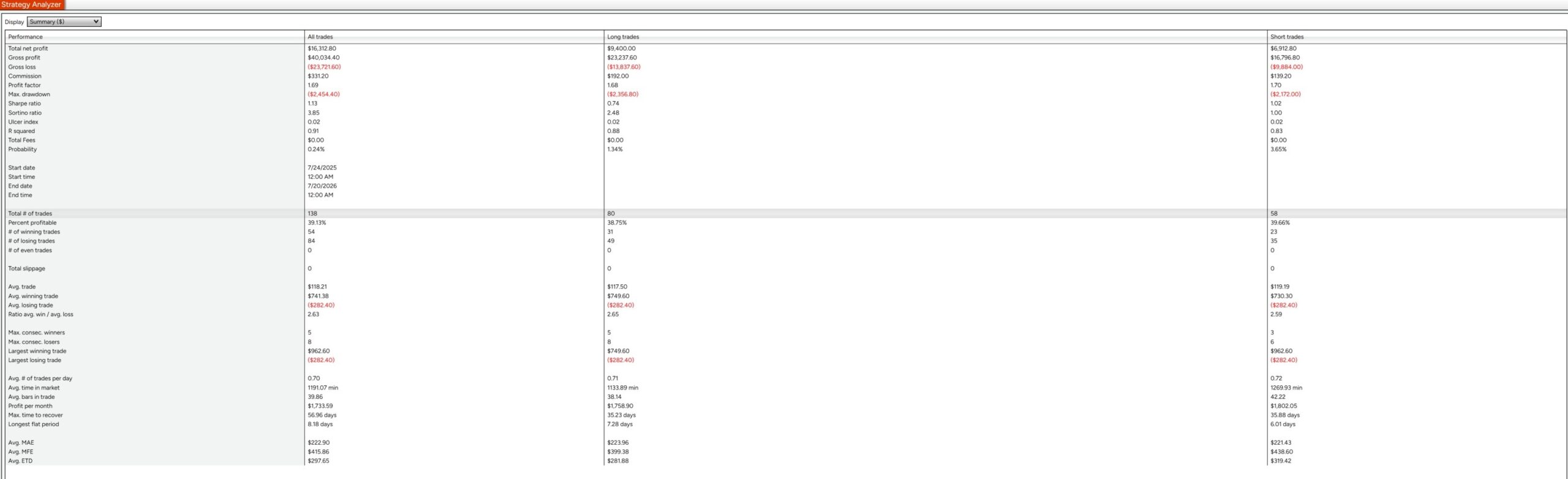
CFTC RULE 4.41 — HYPOTHETICAL PERFORMANCE DISCLAIMER: HYPOTHETICAL OR SIMULATED PERFORMANCE RESULTS HAVE CERTAIN INHERENT LIMITATIONS. UNLIKE AN ACTUAL PERFORMANCE RECORD, SIMULATED RESULTS DO NOT REPRESENT ACTUAL TRADING. ALSO, SINCE THE TRADES HAVE NOT ACTUALLY BEEN EXECUTED, THE RESULTS MAY HAVE UNDER- OR OVER-COMPENSATED FOR THE IMPACT, IF ANY, OF CERTAIN MARKET FACTORS, SUCH AS LACK OF LIQUIDITY. SIMULATED TRADING PROGRAMS IN GENERAL ARE ALSO SUBJECT TO THE FACT THAT THEY ARE DESIGNED WITH THE BENEFIT OF HINDSIGHT. NO REPRESENTATION IS BEING MADE THAT ANY ACCOUNT WILL OR IS LIKELY TO ACHIEVE PROFITS OR LOSSES SIMILAR TO THOSE SHOWN. Automated algorithmic trading involves substantial risk of loss and is not suitable for every investor. Users are solely responsible for configuring and monitoring their trading infrastructure, position sizing, and risk parameters across live, simulated, or evaluation accounts.
Disclaimer: Automated algorithmic trading involves substantial risk of loss and is not suitable for every investor. Past performance—including backtested statistical metrics—is not indicative of future results. Users are solely responsible for configuring and monitoring their trading infrastructure, position sizing, and risk parameters across live or evaluation accounts.
© 2026 Lupo Markets. All rights reserved.